Use case

Document chat —
data comes from a question, not from report building

"How much did we pay this partner last year?" — today that means a filter, an export and a spreadsheet. DocAI Chat answers it from your own archive, with source references: it finds the relevant documents and invoice data, then composes the answer from them. The models run on-premise; questions and documents are never sent to an external AI provider.

It answers from your own archive, not from the internet

Once a question is asked, the system runs a RAG-based search: keyword and semantic search locate the documents and records relevant to the question, and the answer is built from those. The answer streams in real time, can be interrupted, and the conversation keeps its context — you can refine over several turns.

Behind the scenes the chat calls tools: it searches and summarises documents, identifies a company or partner, computes financial totals, looks up tasks. These tools always work filtered to the user's permissions — everyone can only get answers about what they could open anyway.
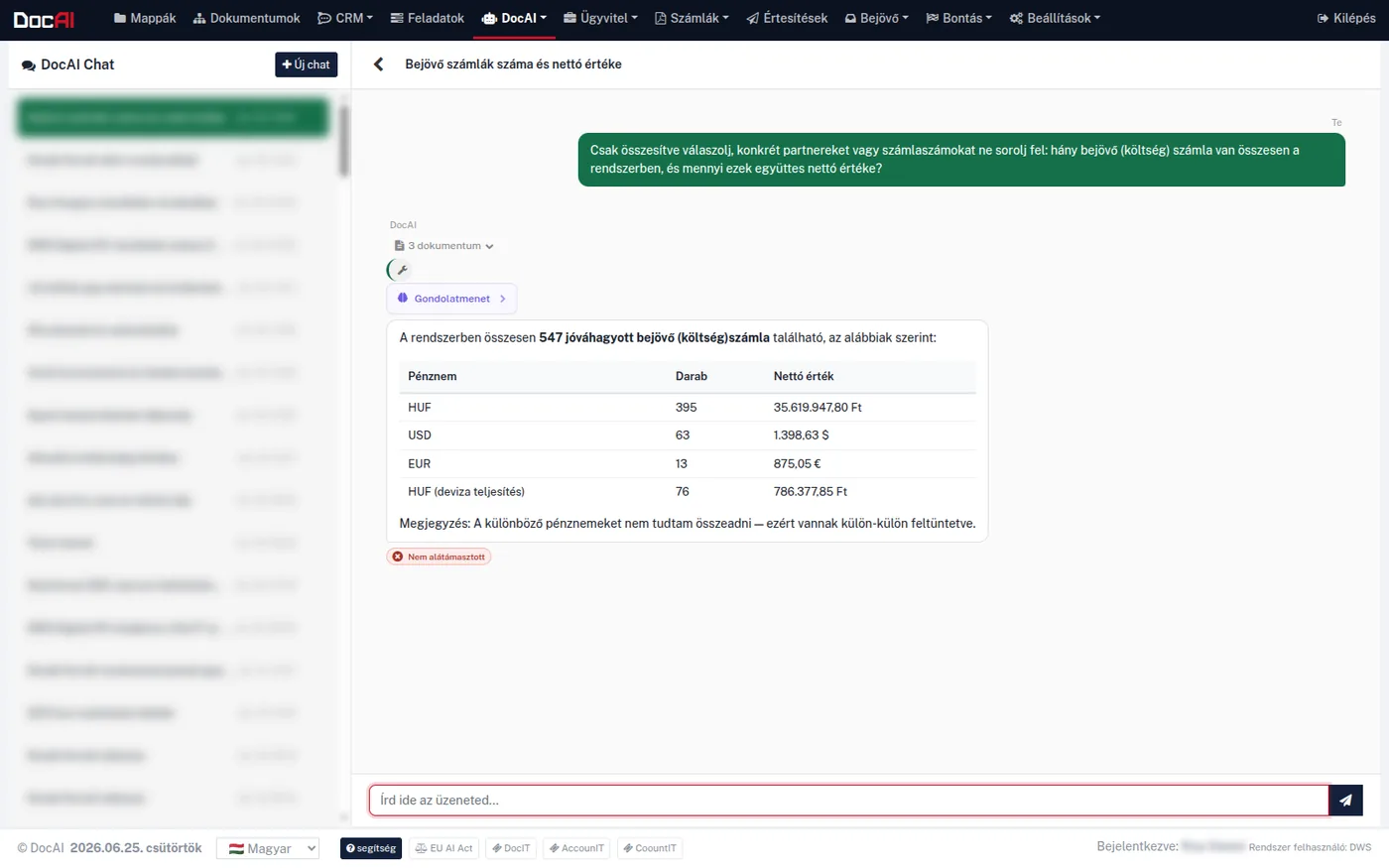
DocAI Chat: a natural-language question about incoming invoices answered in a table broken down by currency, with source documents and reasoning shown
The system shows how many documents it worked from, the reasoning can be reviewed, and it flags below the answer when a statement cannot be traced back to a source. The conversation list and the user name are masked in the screenshot.

What kind of questions does it answer?

Typically the ones that used to require building a report.

Financial totals
Net, VAT and gross totals with time-series breakdown (weekly, monthly, quarterly) — a monthly VAT summary from a single question
Receivables and payables
Open customer receivables and supplier payables by due date, broken down per partner
Payment behaviour
Average payment delay, on-time payment ratio, outlier delays — for customers and for your own payment discipline
Rankings
Highest-volume partners, most purchased items, with unit price statistics and price anomaly flags
Documents and partners
Document search and summarisation by title, type, tag, date, full-text and semantic content; company lookup by name or tax number
Contracts
For example "which of our contracts expire this year" — drawing on the contract portfolio
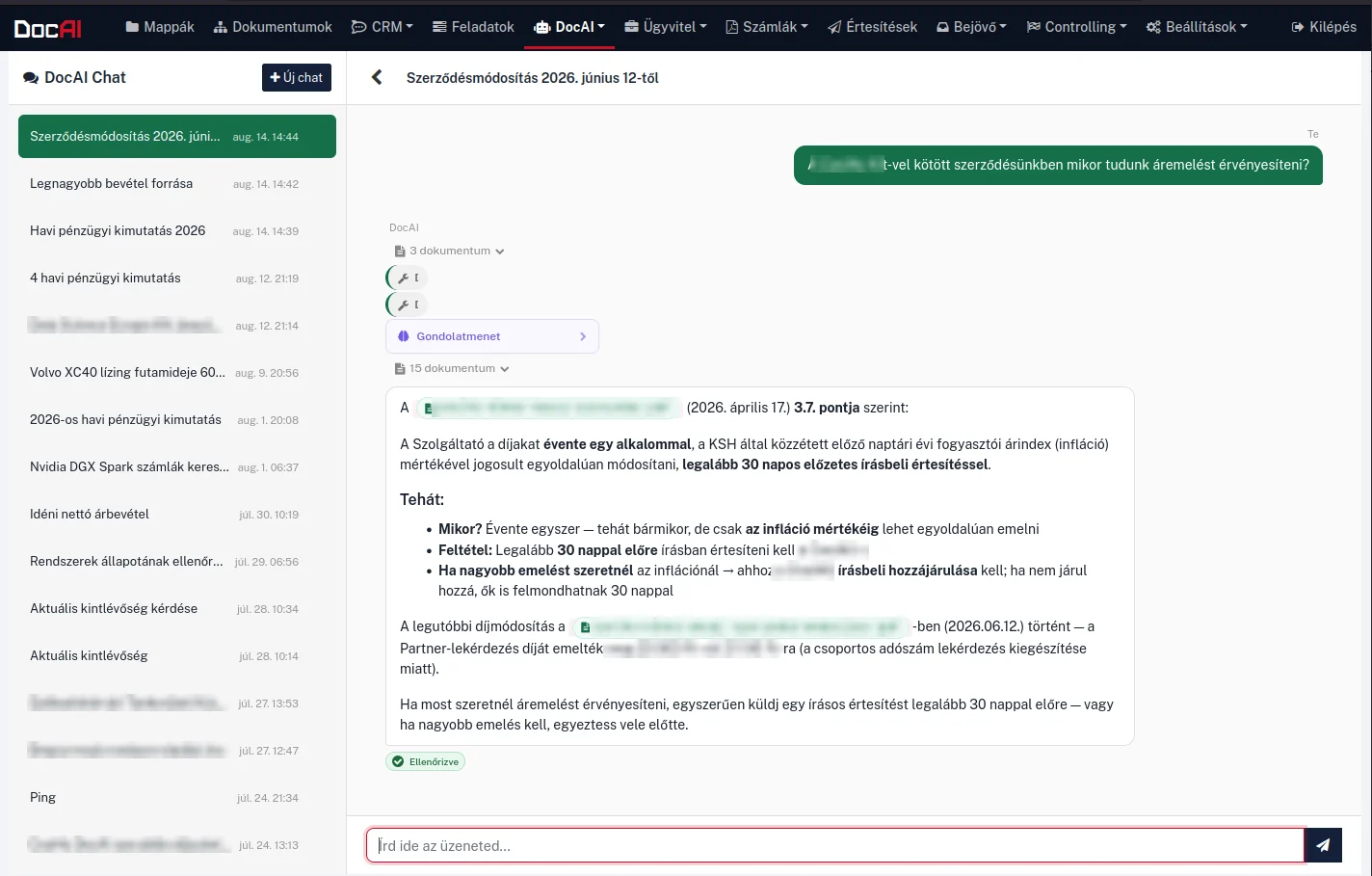
DocAI Chat: an answer to a contract question quoting the relevant clause, with source documents and a "Verified" badge
A contract question answered from the specific clause. The system marks which document it relied on, and the “Verified” badge shows the statement can be traced back to a source. The partner name, file names and fees are masked in the screenshot.

How do I know the answer is true?

Every answer shows which documents the system worked from, and the reasoning can be reviewed. A built-in check examines whether a statement can be traced back to a source; when it cannot, the system says so next to the answer — it does not hide it.

The assistant does not invent financial or partner data: if a value is missing, it reports that instead of filling the gap with an estimate. By default it performs read-only operations on your data — it does not modify or delete. The only exceptions are explicitly requested actions gated behind two-step confirmation.

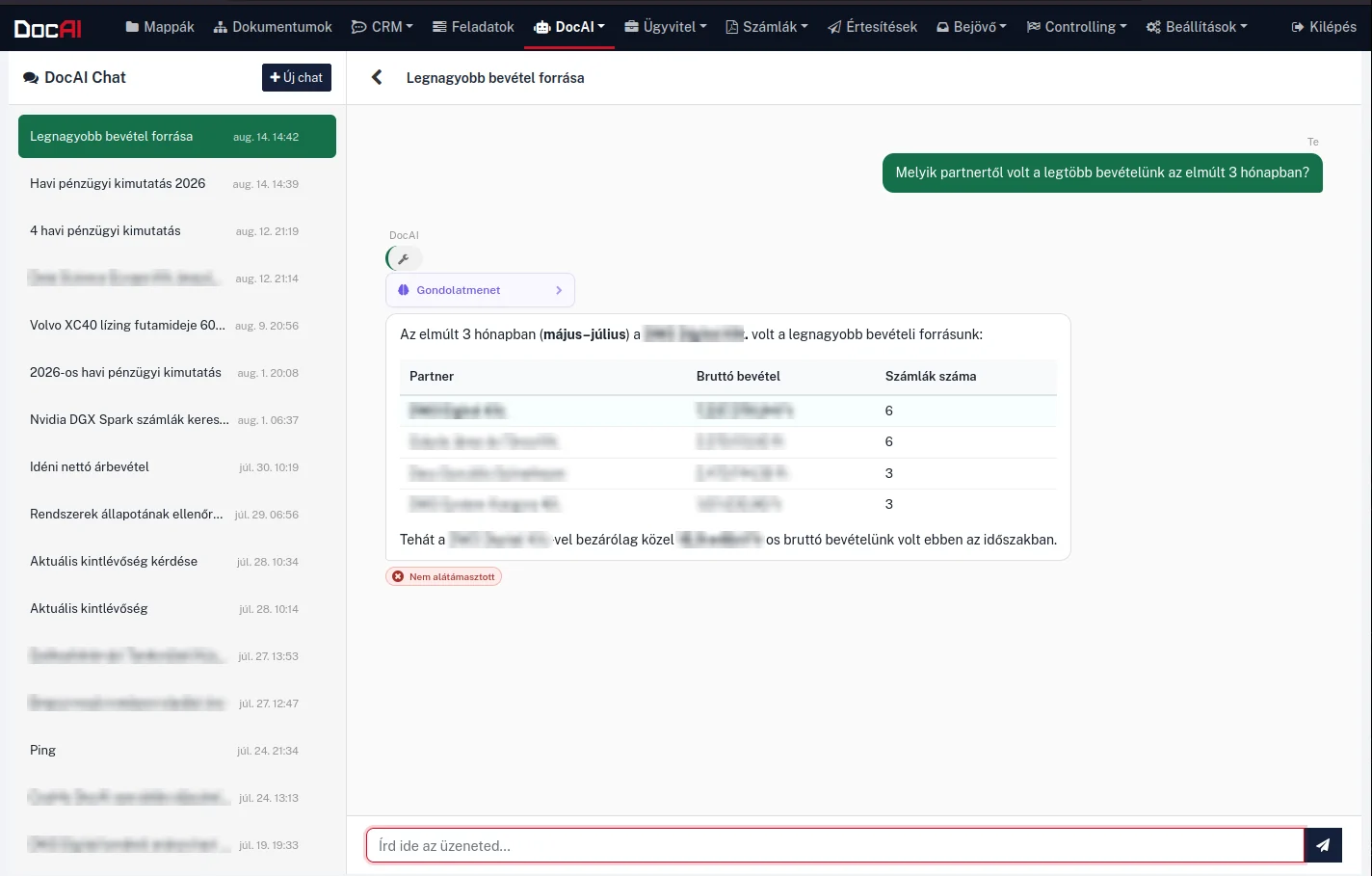
DocAI Chat: revenue ranking per partner in a table, with a "Not supported" badge below the answer
A ranking question answered as a table, broken down by partner. The “Not supported” badge below the answer warns that part of the summary cannot be traced directly back to a source. Partner names and amounts are masked in the screenshot.

A longer report does not stay in the chat window

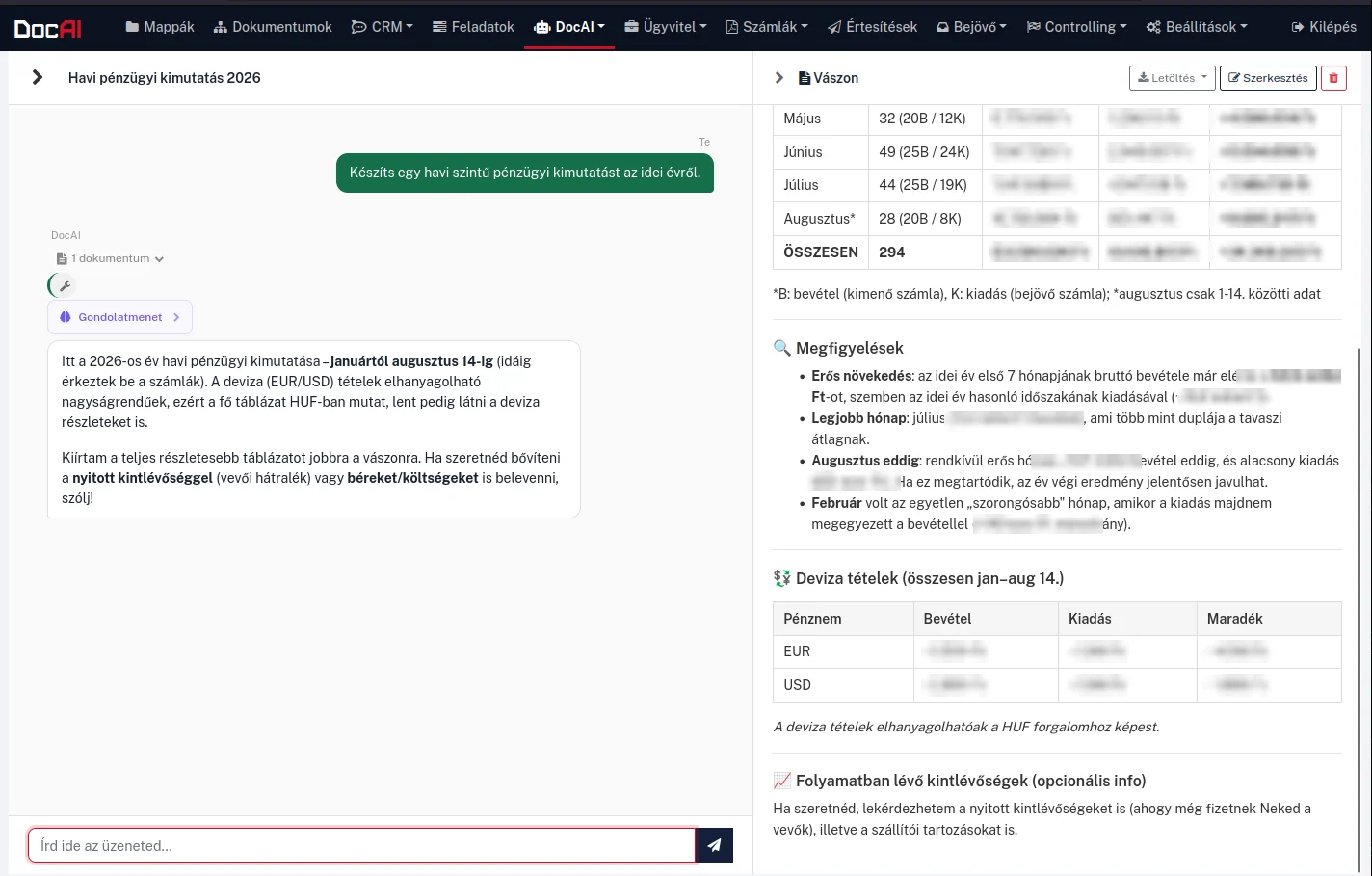
When the answer runs longer than a paragraph — a month-by-month financial summary, say — the system writes it onto a canvas that opens beside the conversation. There it is readable and editable at full width, while the chat stays open, so the report can be extended on the fly: just ask for open receivables or payroll costs to be included as well.

From the canvas the finished report downloads in one click as PDF, Word (docx) or Excel (xlsx) — in the form you would forward it or drop it into a board pack.

DocAI Chat: the conversation on the left, a month-by-month financial report with table and observations on the canvas to the right
The report lands on a canvas next to the conversation. From there it can be edited and downloaded, and refined further in the chat. Amounts are masked in the screenshot.

Notifications, tasks, downloadable files

From the chat you can send an email to an internal user or — with confirmation — to an external partner, with attachments; Telegram notifications can be set up too. Scheduled and one-off tasks can be created (daily, weekly, monthly, quarterly), always with two-step confirmation.

The answer can be turned straight into a downloadable file: Markdown → Word (docx) or PDF, CSV → Excel (xlsx), HTML → a standalone web page. Letters, summaries and lists come out in a shareable form immediately. Text fields also support Hungarian voice dictation with a locally running model — here too, the data never leaves the infrastructure.

Document chat — frequently asked questions

What is document chat?

You can ask questions in natural language about your own documents, invoices and partners, and the system answers from your own archive — not from the internet. Behind the scenes a RAG-based search runs: the system finds the documents and records relevant to the question and composes the answer from them, with source references. The answer streams in real time and can be interrupted.

How do I know the answer is true?

Every answer shows which documents the system worked from, and the reasoning can be reviewed. A built-in check examines whether each statement can be traced back to a source; when it cannot, the system says so next to the answer. The assistant does not invent financial or partner data: if a value is missing, it reports that instead of filling the gap with an estimate.

Can the assistant modify or delete data?

By default no: the assistant performs read-only operations on your data. The only exceptions are explicitly requested, confirmation-gated actions — such as sending an email, a Telegram notification or creating a task; these run with two-step confirmation.

What kind of questions can I ask?

Typically the ones that used to require building a report: the net, VAT and gross totals for a period in weekly, monthly or quarterly breakdown; open customer receivables and supplier payables by due date; which partner pays late on average; who the highest-volume partners are; which contracts expire this year. Beyond that, the chat searches and summarises documents, looks up companies and users, and can create tasks.

Where do the models behind the chat run?

In on-premise mode, on the organisation's own GPU server — as do extraction and Hungarian voice dictation. Questions and documents are not sent to an external AI provider. The chat works filtered to the user's permissions: everyone can only get answers about what they could open anyway.
See it on your own documents

In a 30-minute demo we walk through your own workflow — with your documents, on your terms. No obligation.

Request a demo

One engine, several areas

The same processing engine serves every area — introducing one gives you the whole engine.

All use cases →

Get in touch

Fill out the form below and our team will reach out shortly to schedule a demo.

Please provide your name.
Please provide a valid email address.
Please provide a company name.
Format: 12345678-2-41

We only use your data to respond to your inquiry. We do not share it with third parties. Legal basis: your consent and pre-contractual steps (GDPR Art. 6(1)(a) and (b)). For details, see our privacy policy.