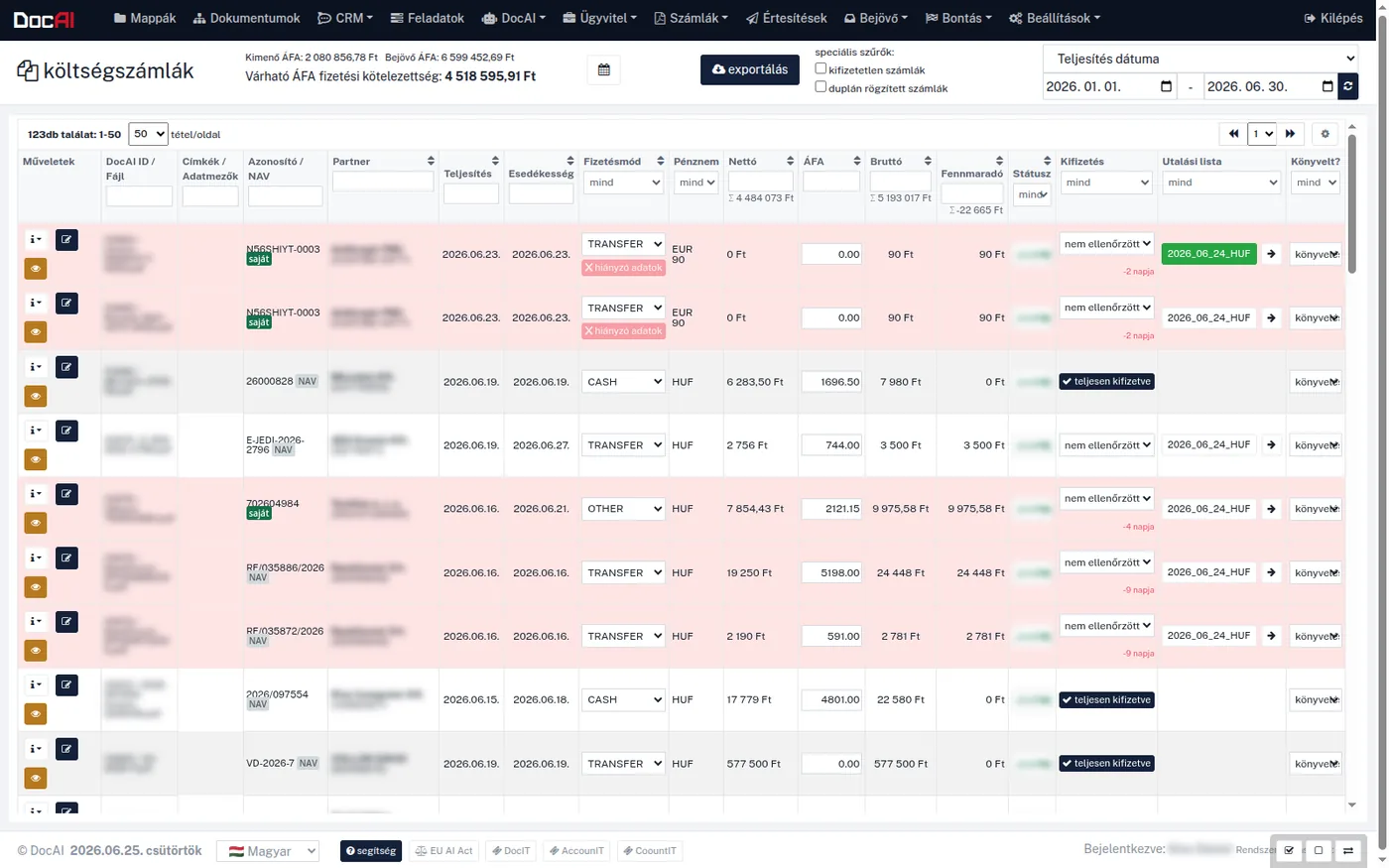
In most companies an incoming invoice is still a PDF that someone opens, reads and retypes into another system. DocAI removes that step: it reads the invoice data, checks the partner against four authoritative registries, reconciles it with NAV data — and hands the approver a pre-qualified item instead of a raw file. Processing runs on the company's own server; the invoices never leave the organisation.
At most companies the incoming invoice is already digital: it arrives by email, lands in a folder, maybe in a records management system. So the document exists — it just knows nothing about itself. For it to reach accounting, someone has to read it, collect eight to ten values from it, and then verify that the partner is a real, operating company at all.
This work is monotonous, which is exactly why people get it wrong: a mistyped bank account number, a missed payment deadline, an invoice recorded twice. DocAI automates that stretch — the reading and the checking — while approval stays where the responsibility is: with the user.
Five steps, four of them automatic. The fifth deliberately is not.
Not a text answer, but field-level data — the kind that can go straight into accounting.
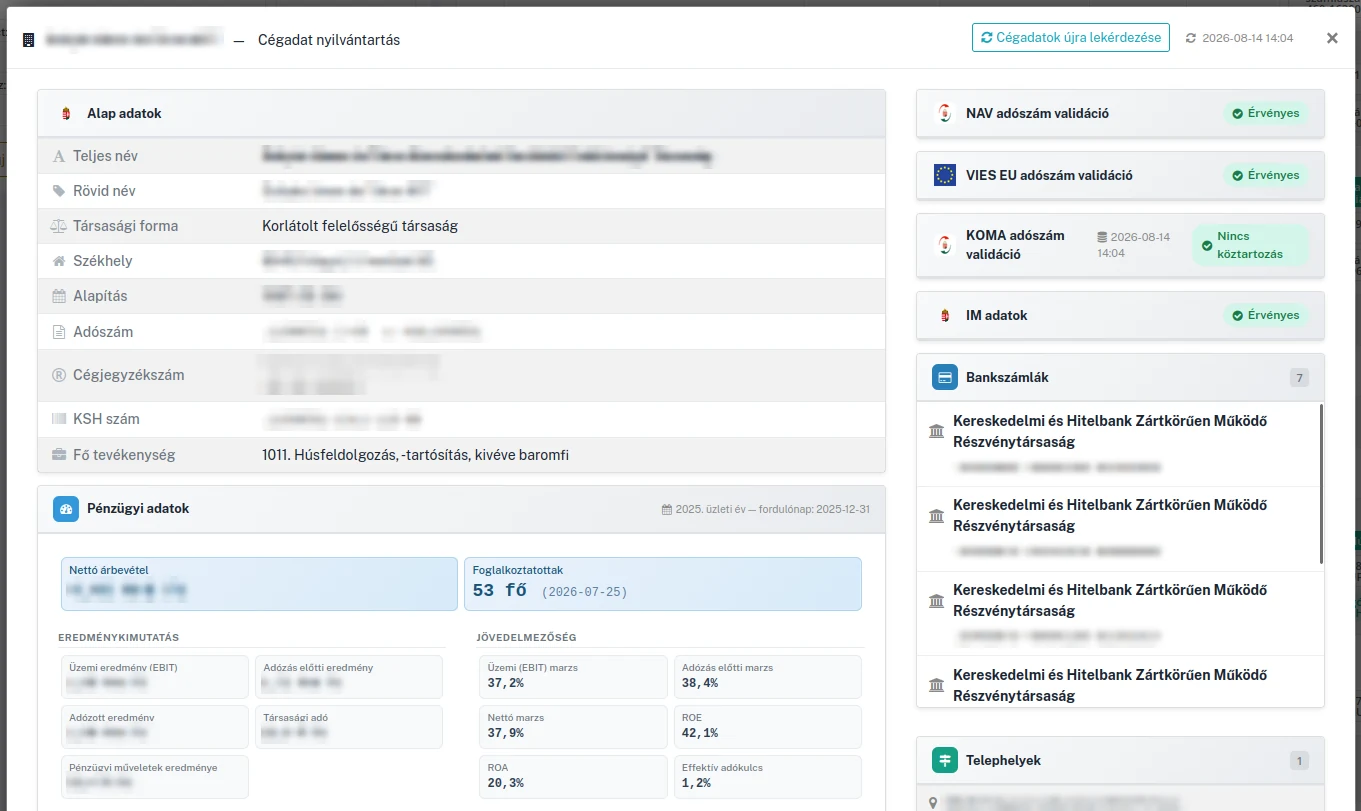
Approval has an invisible first filter that nobody enjoys doing by hand. This is the part that runs automatically, on every incoming invoice.
| Source | What it checks |
|---|---|
| NAV | Whether the tax number is valid and the VAT status active; company name, address and group taxation membership |
| Ministry of Justice (IM) | Validity, address, legal form; whether the bank account on the invoice matches the registered official one |
| VIES | Validity of EU partners' community VAT numbers |
| KOMA + public filings | Freedom from public debt and published financial data |
The system also cross-checks your own company data against the document — resolving Hungarian address abbreviations, comparing order-independently. Results appear per source with colour coding and an aggregate reliability signal.
NAV Online Invoice. Outgoing invoices can be submitted automatically or manually, with submission status and errors reported back. Incoming and outgoing data can also be queried from NAV: the system reconciles it with the OCR-extracted invoices, filters duplicates, and marks which values were synchronised from NAV.
Bank reconciliation. Bank statements are read for opening and closing balance, period and transactions, then bank items are matched automatically to open invoices — on an amount and date window, handling partially paid invoices too. Payment deadlines feed a daily cash-flow forecast.
Currencies and transfers. Multiple currencies, IBAN/SWIFT recognition, and transfer files in EDIFACT (HUF and EUR) and ISO 20022 (MBH XML) formats with structured beneficiary addresses. Recurring invoicing can be scheduled (monthly, quarterly, annually), and invoice data with attached PDFs can be forwarded in the background to an external accounting or ERP system (for example Oriana), with validation and a history log.
Five departments, 30–70 incoming documents a day. DocAI produces the payment package from the invoices through key information extraction, and the bank application imports it as a file — work that 1–2 people used to record by hand. Read the case study →
On the Hungarian invoice corpus the production model reaches 0.975 F1 at field level. The methodology and raw results are public: docai-evals. Why we measure this way →
Invoices are processed on the company's own infrastructure rather than at an external AI provider — not a minor detail for GDPR compliance. GDPR and the EU AI Act in practice →
The incoming invoice arrives by email, upload or an invoicing-system link. DocAI recognises that it is an invoice, reads its text with OCR, then fills the fields through structured extraction (KIE): invoice number, dates, amounts, partner data, bank account number and the line items. In parallel, the partner checks and the NAV matching run. All that is left for the user is to review and approve — the decision stays in human hands throughout.
From the header: invoice number, issue, fulfilment and payment due dates, payment method, currency, net, VAT and gross amounts, own and partner company data, bank account number and contract reference. From the line items: description, quantity, unit price, VAT rate and line total. On international invoices the beneficiary's postal address, bank name, IBAN and SWIFT/BIC are recognised as well.
Yes, on every incoming invoice, against four authoritative sources: the NAV taxpayer registry (valid tax number, active VAT status), Ministry of Justice company records (validity, address, legal form, and whether the bank account on the invoice matches the registered one), VIES (EU VAT number) and KOMA (freedom from public debt). Results are shown per source with colour coding and an aggregate reliability signal.
Yes. Outgoing invoices can be submitted to the NAV Online Invoice system automatically or manually, with submission status and errors reported back. Incoming and outgoing invoice data can also be queried from NAV: the system reconciles it automatically with the OCR-extracted data, filters duplicates, and marks whether a value came from NAV or was entered manually. Data coming from NAV is locked.
Yes. The system handles multiple currencies (HUF, EUR, USD and others) to the cent, with a separate own currency for fulfilment when it differs from the one on the invoice. Bank transfer files are produced in EDIFACT (HUF and EUR) and ISO 20022 (MBH XML) formats, with structured beneficiary addresses.
In a 30-minute demo we walk through your own workflow — with your documents, on your terms. No obligation.
Request a demoThe same processing engine serves every area — introducing one gives you the whole engine.
Field-level KIE from invoices, contracts, payslips and bank statements — with confidence signals.
Read more →Central contract portfolio, 30/60/90-day expiry monitoring, expected vs. actual billing.
Read more →Ask your own archive in natural language and get source-referenced answers.
Read more →Fill out the form below and our team will reach out shortly to schedule a demo.
We only use your data to respond to your inquiry. We do not share it with third parties. Legal basis: your consent and pre-contractual steps (GDPR Art. 6(1)(a) and (b)). For details, see our privacy policy.