Use case

Data extraction from documents —
precise, book-ready data

A document is only worth something once the data inside it can be moved into a system: the net amount into an amount field, the deadline into a date, the partner into an identified company. That is the step DocAI performs — on Hungarian invoices, contracts, payslips and bank statements — with a confidence signal and a reference back to the source page. Processing runs on the company's own server.

OCR, chat, KIE — three different things

Many products call something "AI document processing" when it is really just search or chat over documents. The difference is in the output.

Comparison of OCR, document chat and structured extraction
Aspect OCR Chat / RAG KIE — extraction
What it returns Characters: the text in the image A text answer to a question Filled fields: amount, date, partner, line items
Deterministic? Yes, but it does not understand the content No — depends on the question, not guaranteed complete Yes: the same document yields the same fields
Can it feed accounting? No, someone has to interpret it first Not directly, not field by field Yes — that is the point
Good for Findability, full-text search Asking, summarising, orientation Replacing data entry, automated checks

DocAI does all three — OCR and document chat are part of the system too — but its backbone is structured extraction.

What is extracted from what?

The system first detects the document type, then routes the document to the matching extraction path.

Incoming and outgoing invoices
Invoice number, dates, payment method, currency, net/VAT/gross, company data, bank account, line items — see the invoice processing page
Contracts
Contract number, title, type, signature and expiry dates, notice period, currency, total value, indexation clause — see the contract management page
Payslips
Gross and net pay (transferred and cash split), personal income tax, deducted contributions, employer social contribution, fringe benefits and their tax, period — on a dedicated, confidential processing path
Bank statements
Account-holding bank, opening and closing balance, period, transactions (date, direction, amount, reference)
Completion certificates
Date, description, acceptance — linked automatically to the related contract and invoice
Other documents
OCR and full-text search on every uploaded PDF, JPG and PNG — not just on the file name
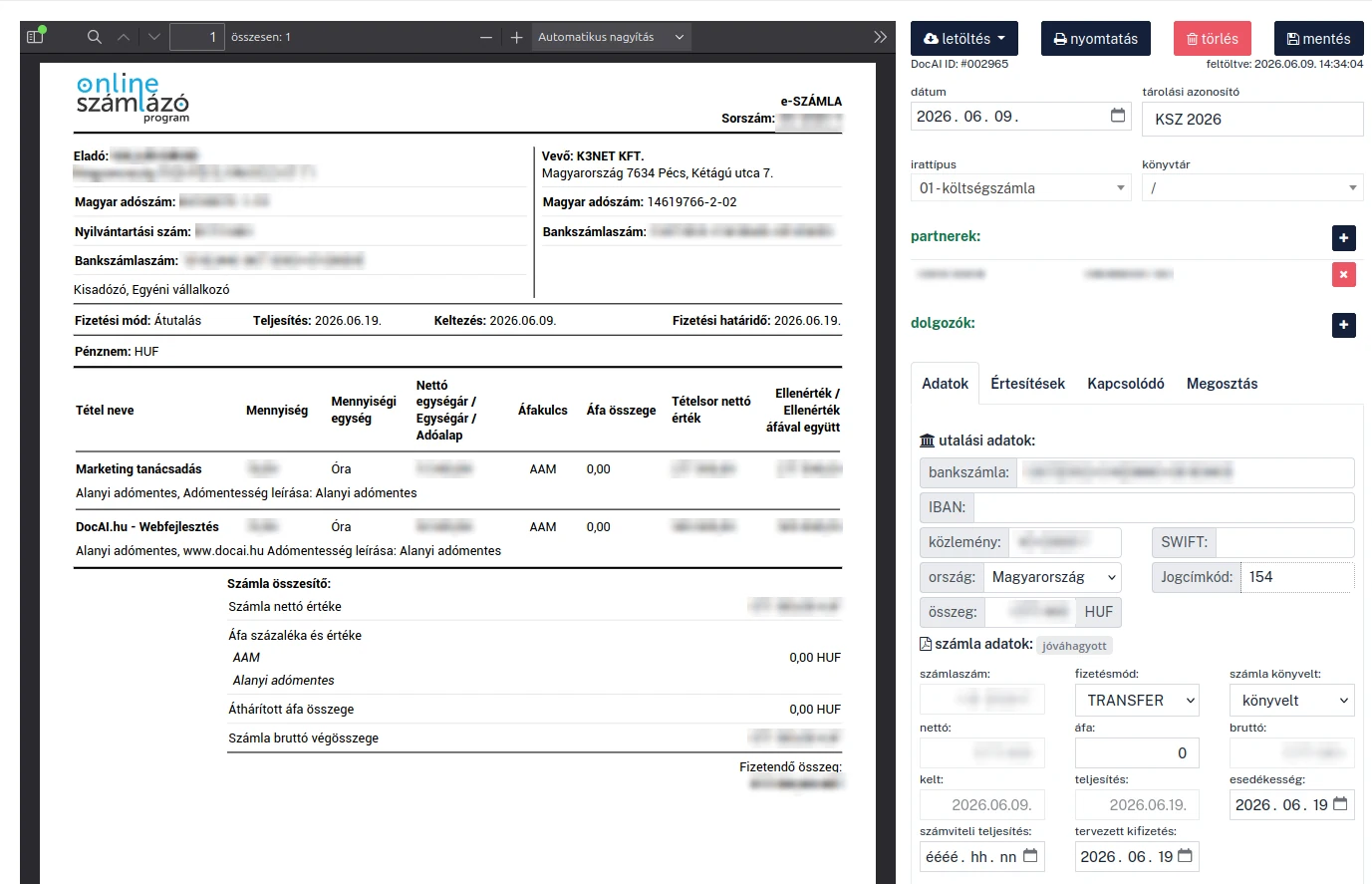
DocAI document view: the original invoice on the left, automatically extracted fields on the right — transfer data, net, VAT, gross, dates
The original document on the left, the extracted structured fields on the right. All the user has to do is review — and from a field they can jump to the matching page of the source PDF. Partner data, bank account numbers, unit prices and totals are masked in the screenshot.

What happens when the system is unsure?

Every extracted field carries a confidence level, colour-coded. That is not decoration: it tells you where it is worth looking at the original. From the field you can jump in one click to the matching page of the source PDF — so verification takes seconds instead of a re-read.

When the system is unsure, it leaves the field empty rather than inventing a value. This is a deliberate design decision: an empty field is a visible gap, while an invented value slips into accounting unnoticed. The AI proposes — approval stays a human decision.

How accurate is it? We measured

Our model choices are decided by our own measurements on Hungarian documents and our own hardware — not by vendor datasheets.

0.975 F1 on a Hungarian corpus

Field-level F1 of the production model on the Hungarian KIE corpus. The comparison in detail: Gemma4 vs. Qwen3.6 →

Public measurement material

Methodology, configurations and raw results are available in the docai-evals repository — including the negative results.

We measure the measuring tool too

One of our error detectors once confidently claimed the opposite of reality. We wrote up how it came out: When the eval lies →

Data extraction — frequently asked questions

What is key information extraction (KIE), and how is it different from OCR?

OCR recognises the text in an image — its output is a sequence of characters. Key Information Extraction (KIE) goes one step further: it tells you which number in that text is the net amount, which date is the payment deadline, and which company name is the partner. The output is structured, field-level data that can be fed straight into accounting — not a text answer someone has to interpret again.

Which document types can DocAI extract data from?

The system runs document-type-specific extraction paths: incoming and outgoing invoices, contracts, payslips, bank statements and completion certificates. It detects the document type automatically and routes the document to the matching processing path. Payslips are processed on a dedicated, confidential path, separated from the general document flow.

How accurate is extraction on Hungarian documents?

Accuracy is measured on our own annotated corpus of Hungarian business documents, using field-level F1. The current production model reached 0.975 F1 on the Hungarian KIE corpus. The methodology and the raw results are public in the github.com/k3net/docai-evals repository — including the measurements that did not turn out as expected.

What happens when the system is unsure about a field?

Each extracted field carries a confidence level shown as a colour code, and from the field you can jump to the page of the source PDF where the value appears. When uncertain, the system leaves a field empty rather than inventing a value: the AI proposes, and the final approval remains a human decision.

Do documents leave the company for processing?

In on-premise mode, no. OCR, extraction, the search index and the language model all run on the organisation's own GPU server; no document data goes to an external cloud provider. Files are stored encrypted, access is role-based, and every open, change and download is logged.

See it on your own documents

In a 30-minute demo we walk through your own workflow — with your documents, on your terms. No obligation.

Request a demo

One engine, several areas

The same processing engine serves every area — introducing one gives you the whole engine.

All use cases →

Get in touch

Fill out the form below and our team will reach out shortly to schedule a demo.

Please provide your name.
Please provide a valid email address.
Please provide a company name.
Format: 12345678-2-41

We only use your data to respond to your inquiry. We do not share it with third parties. Legal basis: your consent and pre-contractual steps (GDPR Art. 6(1)(a) and (b)). For details, see our privacy policy.